Every decision is a step you can read.
AIOS turns what it learned into a workflow in plain English: where it starts, what it checks, which system each step touches, where an expert signs off, and what done looks like. Nothing is hidden in a prompt, and nothing runs until your team approves it.
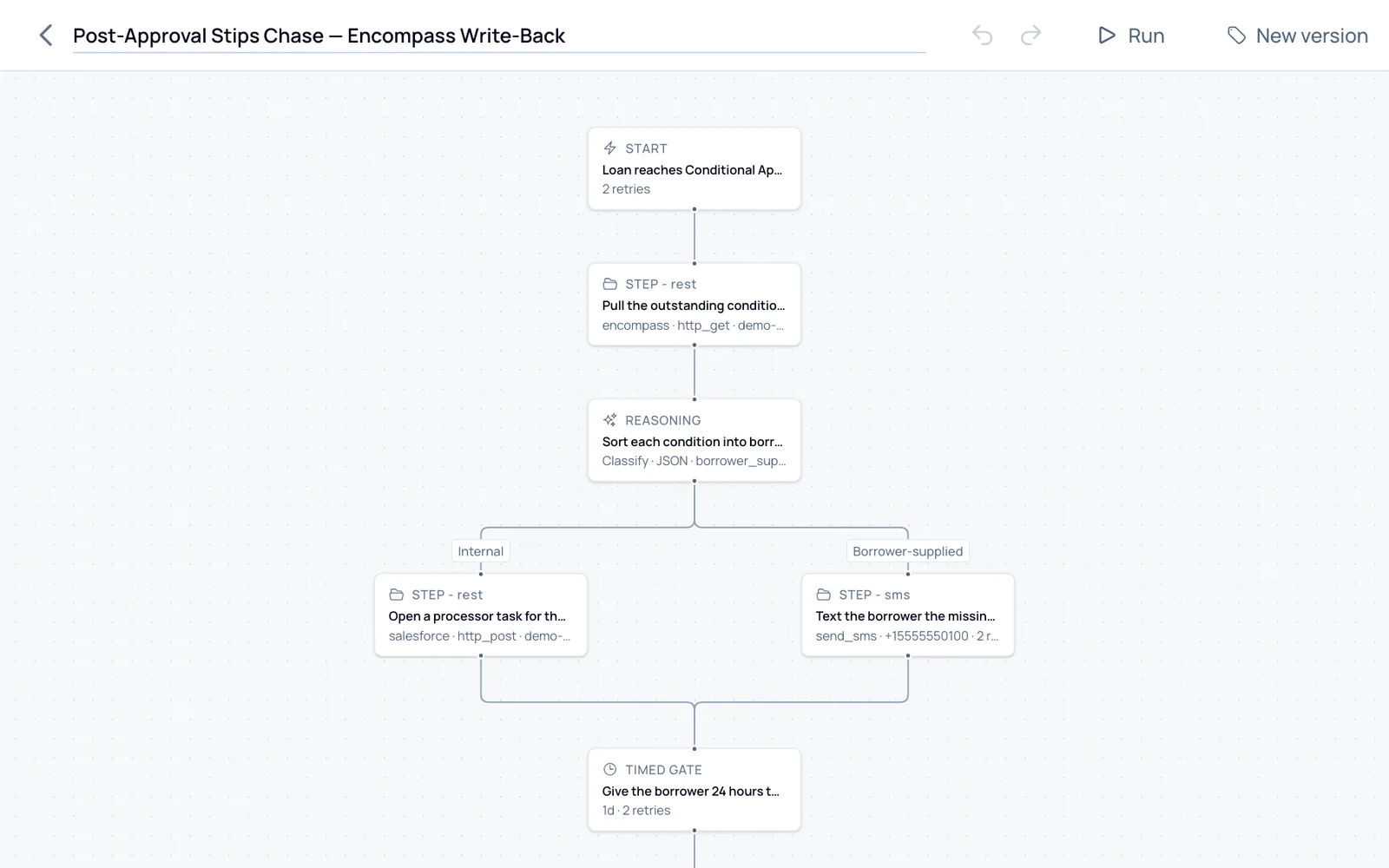
What Blueprint does.
The workflow your team approves is the one that runs. There is no second copy hiding in a prompt.
The plan comes first.
Ask for a workflow and AIOS answers with a plan: the steps, the systems, and the defaults it chose. Approve the plan and it builds the whole thing in one pass, then checks and test-runs it.
Changes arrive as a diff.
Ask for a change, such as a manager's approval before a refund, and AIOS shows exactly what moves: steps added, moved and removed. Small edits, like renaming a step, just happen.
Built from parts anyone can follow.
A workflow starts when something happens, checks what it needs, decides, waits a set time, brings in an expert, and ends at a goal you can check. Each step names the system it touches.
Gaps are marked, not hidden.
A step that needs a system AIOS isn't connected to yet is marked as needing a connection, so nobody mistakes the workflow for finished.
Versions you can go back to.
Every version is kept. The draft you edit stays separate from the release that runs, and a previous release is one step away.
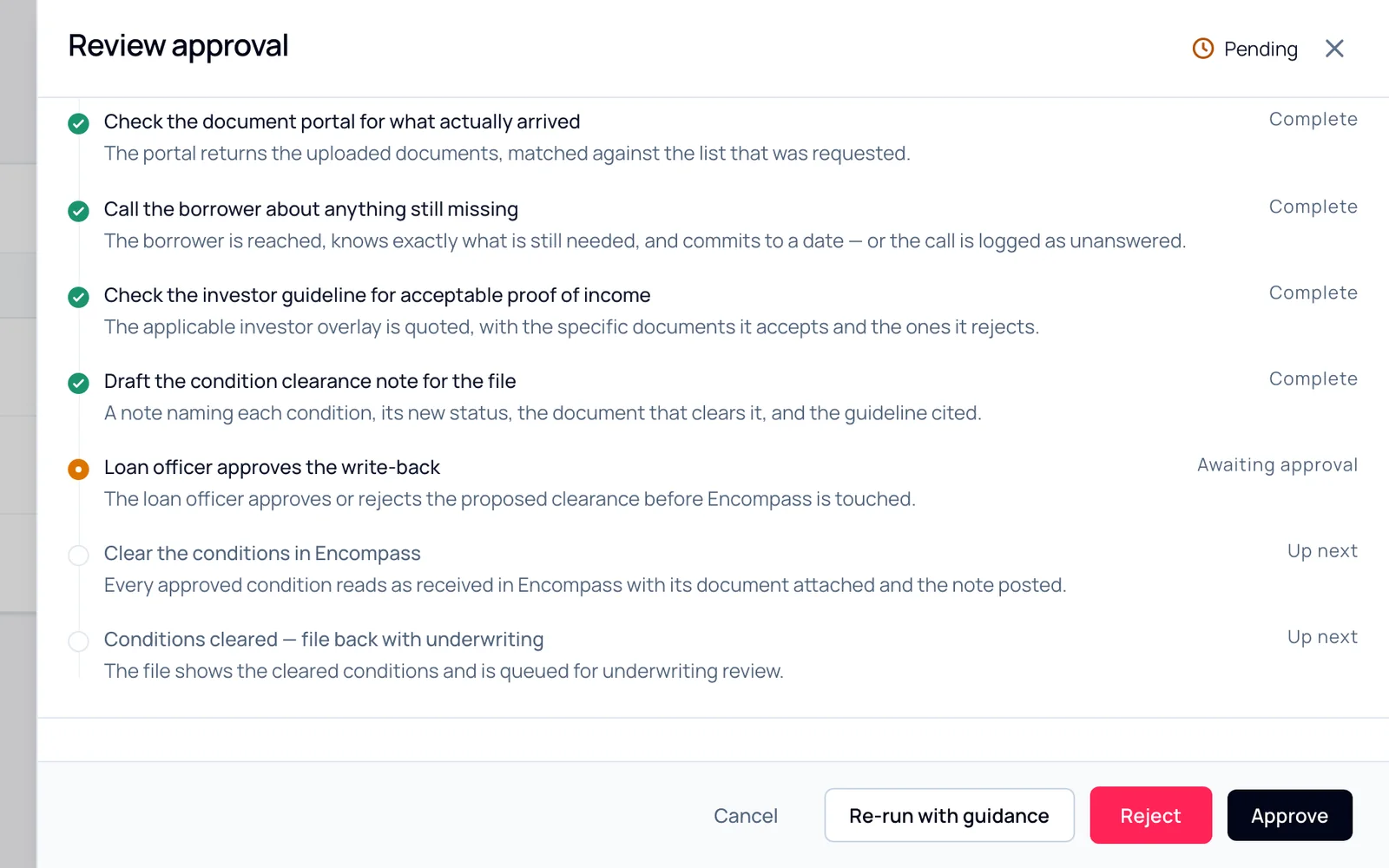
The same steps, as the person signing off sees them.
When a run pauses for an expert's sign-off, they see what has been done, what AIOS wants to do next, and why, in the words the workflow was written in.
How it compares.
Visual editors are common. A workflow written from your expert's own work, then explained run by run, is not.
| Capability | AIOScvlSoft | Agent platformsOpenAI Frontier, Anthropic | Service agentsSierra, Fin, Decagon | AutomationUiPath, Power Automate | In-app agentsSalesforce Agentforce |
|---|---|---|---|---|---|
| Builds from a plain descriptionDescribe the process. It shows a plan first, then builds, checks and test-runs it. | |||||
| A visual canvas for every workflowBranches, loops, approvals, timed waits and versions in one editor. | |||||
| Every run explained in plain languageWhat happened and why, not a log only an engineer can read. |
A category view, not a product audit: each column names one or two examples, and individual products vary. See all 33 rows
Questions.
Does anyone on our side need to code?
No. Your team reads and approves the workflow in plain English. cvlSoft engineers do the initial build with you.
Is the workflow just a long prompt?
No. Each step is a separate part with its own system, inputs and expected result. That is what lets AIOS check every step and explain every run.
What if a step needs a system you don't connect to?
It's marked as needing a connection. Connect the system, reach it through its API or database, or Nightshift autonomously builds the connector.
Can we change a workflow after it's live?
Yes. Describe the change and AIOS shows the diff. The new version goes through the same tests and approval before it replaces the one that's running.